Submit Workflow-Based Request
Purpose
This guide explains how to submit a new Workflow-based Request in PLEX, such as for ID & Permission Changes or Equipment requests.
(If you have already submitted a request and want to check on its approval process, please see the Check Request Status guide instead).
Prerequisites
- You must be logged into PLEX.
Steps
-
Go to plexonline.com and log in to your account.
-
Press
Ctrl + Mto search for "based" in PLEX.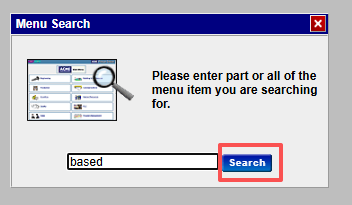
-
Choose "Workflow-based Request" in the menu search results.

-
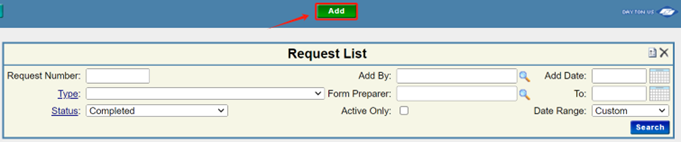
On the Workflow-based Request screen, click the Add button to start a new request.
-
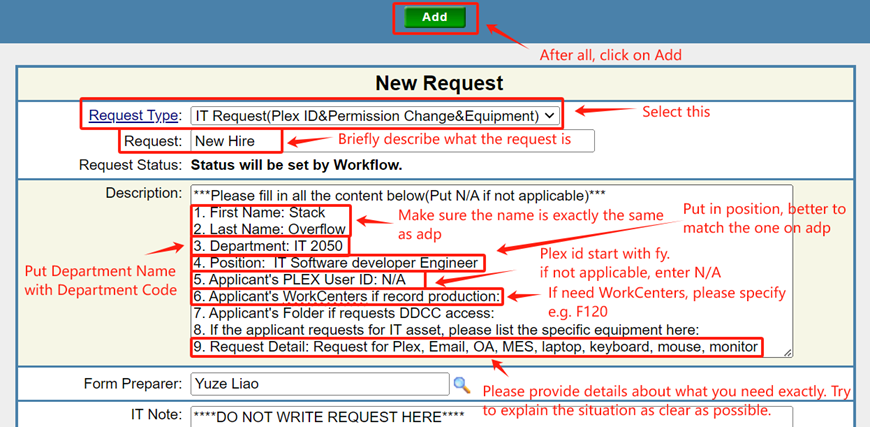
Select the appropriate Request Type from the dropdown (e.g., "01 IT Request(ID&Permission Change&Equipment)"), fill out all required form fields detailing your request, and click Add to route it for Manager approval.
What's Next?
Once submitted, your request will automatically route to the required approvers (such as your Department Manager). You can return to the Workflow-based Request screen at any time to monitor its progress.