Check Workflow Request Status
Purpose
This guide explains how to search for a previously submitted Workflow-based Request in PLEX and check its current approval or completion status.
Prerequisites
- You must be logged into PLEX.
- You submitted a Workflow-based Request.
Steps
-
Go to plexonline.com and log in to your account.
-
Press
Ctrl + Mto search for "based" in PLEX.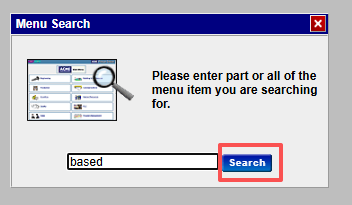
-
Choose "Workflow-based Request" in the menu search results.

-
Enter your search criteria to filter for your specific request.
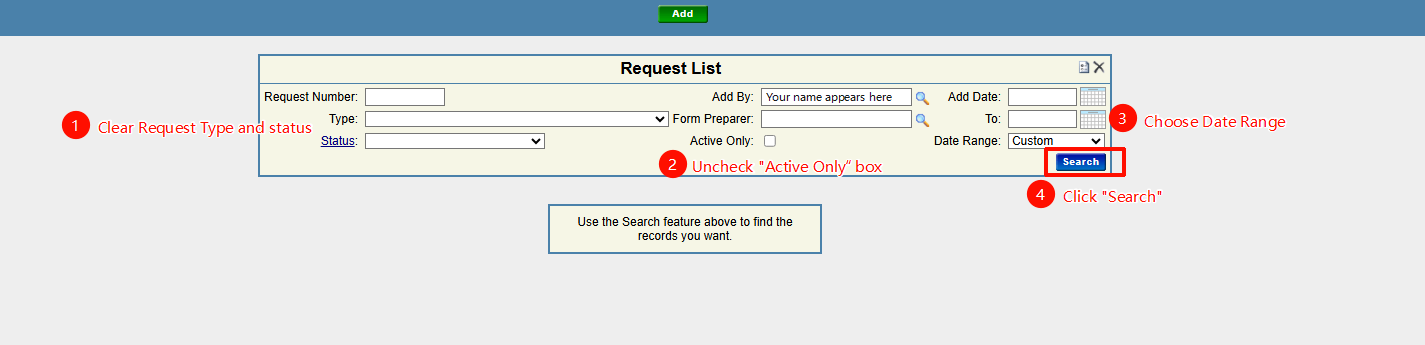
-
Locate your request in the search results and click to open the workflow details.

-
Review the overall status of the workflow at the top of the page.
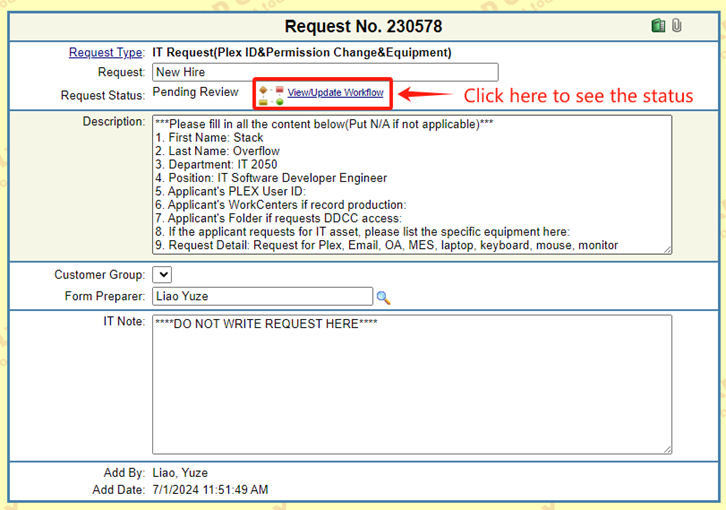
-
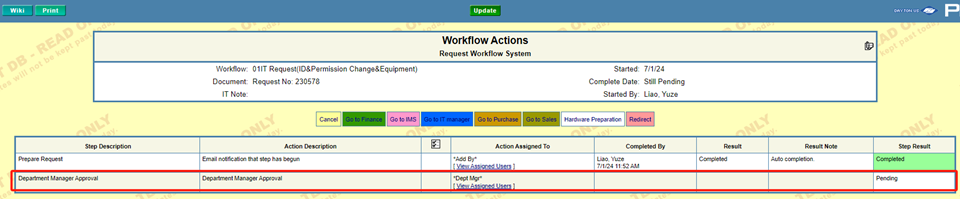
In Workflow Actions page, see who the current step is assigned to ("View Assigned Users"), and check whether it is Pending or Completed.
Common Issues
| Symptom | Likely Cause | Fix |
|---|---|---|
| Cannot find the request | Incorrect date range or filters | Widen your search date range and clear any unnecessary filters to ensure your request isn't hidden. |
| Status still shows "Pending" | Waiting on an approver | Check the "View Assigned Users" in Step 6 to identify whose approval is needed next. |