Request Employee Wi-Fi
Purpose
This guide explains how FGA employees can connect their devices to the fuyao_cell internal employee Wi-Fi network.
Prerequisites
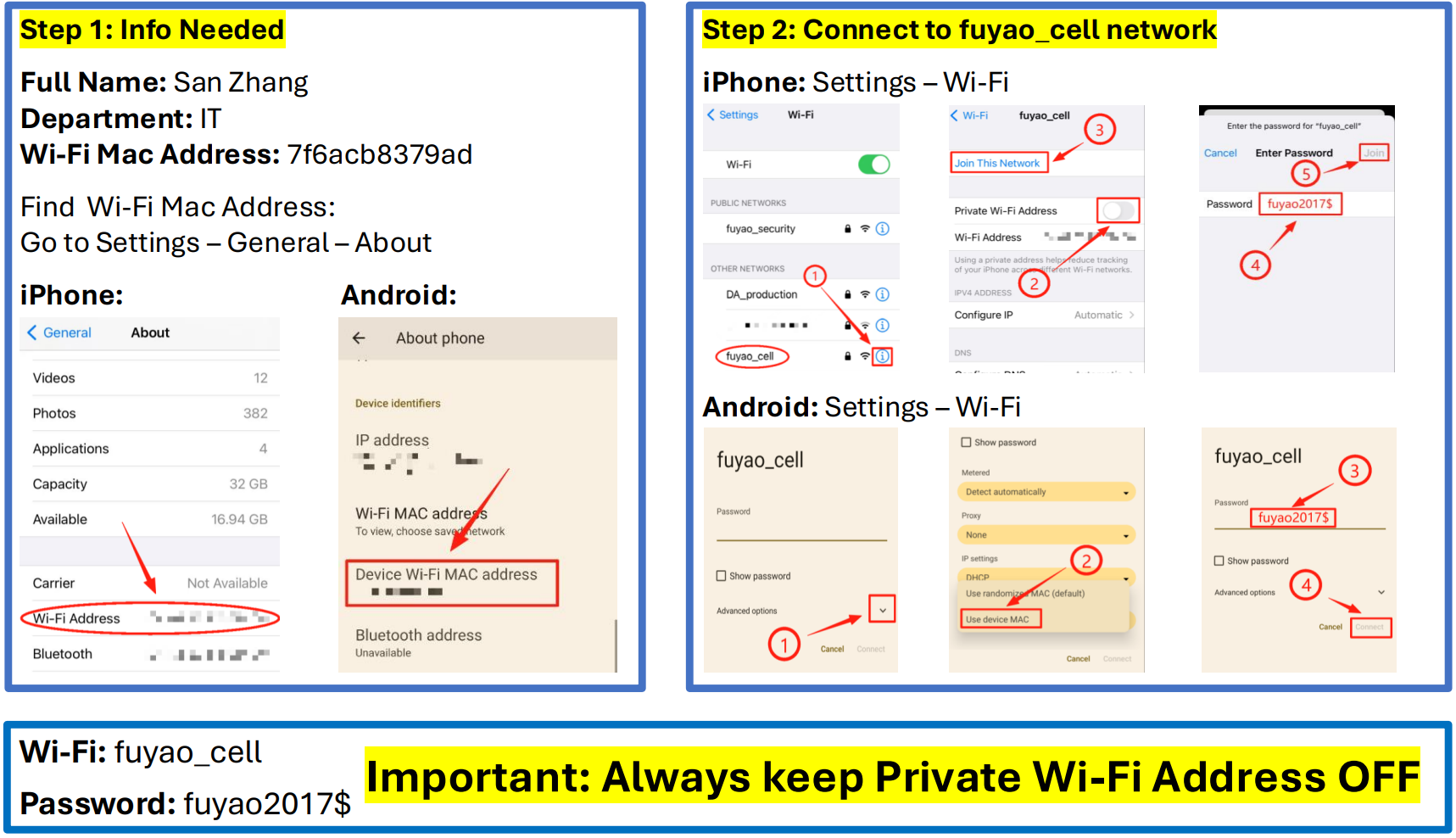
- You must have a device's Wi-Fi MAC Address.
Steps
Submit Your MAC Address and Connect
Before IT can grant you access to the employee Wi-Fi, you must locate your device's Wi-Fi MAC Address. Submit this address, along with your Full Name and Department, by emailing da_it@fuyaousa.com.
Once IT confirms your MAC address is registered, use the provided credentials to connect. Do not skip the "Private Wi-Fi Address" step, or your connection will fail.
Common Issues
| Symptom | Likely Cause | Fix |
|---|---|---|
| Cannot connect / "Incorrect Password" | Private/Random MAC enabled | Ensure "Private Wi-Fi Address" (iPhone) or "Randomized MAC" (Android) is turned OFF for the fuyao_cell network. |
| Connected but no internet | MAC address not registered | Ensure you provided your actual device MAC address to IT, and wait for confirmation that you are approved. |