Reset PLEX Password
Purpose
This guide walks you through resetting your PLEX password. Use this if you're having trouble signing in.
Prerequisites
- Your PLEX Username
- Access to your company Email inbox
Instructions
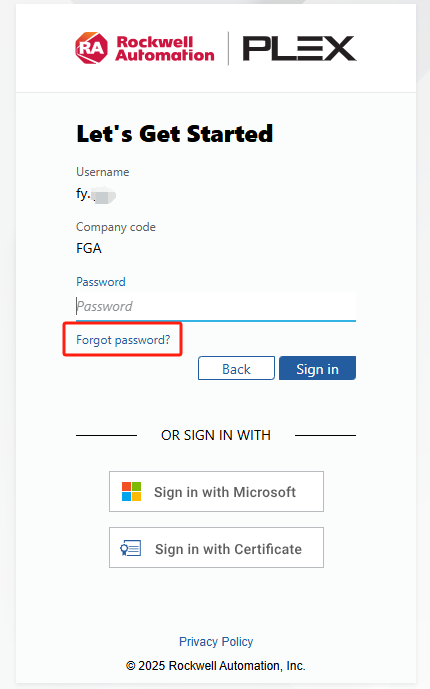
Go to PLEX Login Page. If you would like to change your password or have forgotten it, please click "Forgot password?" on the login page. A password reset email will be sent to your inbox.
What Happens Next
- Check your email for a message from PLEX.
- Click the secure reset link inside the email.
- Create a new password meeting the security requirements (usually minimum 8 characters, with letters, numbers, and special characters).
Common Issues
| Symptom | Likely Cause | Fix |
|---|---|---|
| Never received the reset email | PLEX account is not linked, email went to spam, or PLEX server outage | Check your Junk/Spam folder. If PLEX servers are experiencing an outage, emails may be delayed. Otherwise, your account may not be linked, please contact IT directly. |
| You do not have a company email | Self-service reset requires an email address | You cannot use this method to reset your password. Please contact IT directly to reset your password. |
| Cannot access email | Locked out of Windows/Outlook | You must contact IT directly, as you need email access to reset your PLEX password. |