Request Guest Wi-Fi
Purpose
This guide explains how visitors, contractors, or employees can apply for and connect to the FGA Guest Wi-Fi network.
Step 1: Request Access
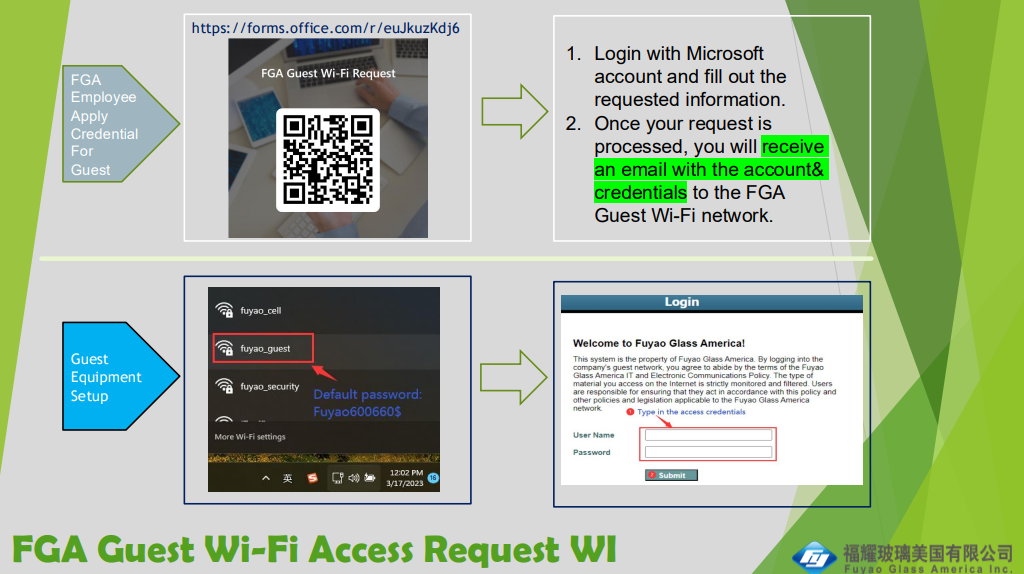
- Scan the QR code below or click the following link: https://forms.office.com/r/euJkuzKdj6
- Log in with your Microsoft account (if prompted) and fill out the requested information in the form.
- Once your request is processed and approved, you will receive an email containing the account credentials (User Name and Password) for the guest network.
Step 2: Connect to Wi-Fi
- Open the Wi-Fi settings on your device (laptop or phone).
- Select the
fuyao_guestnetwork from the list of available networks. - When prompted, enter the default network password:
Fuyao600660$
Step 3: Authenticate
- After connecting to
fuyao_guest, a captive portal login page will appear in your browser. (If it does not appear automatically, try navigating to any website likegoogle.com). - Read the Fuyao Glass America IT and Electronic Communications Policy agreement.
- Type in the User Name and Password you received via email in Step 1.
- Click Submit. You are now connected to the guest internet.